第一步:创建 Service Account
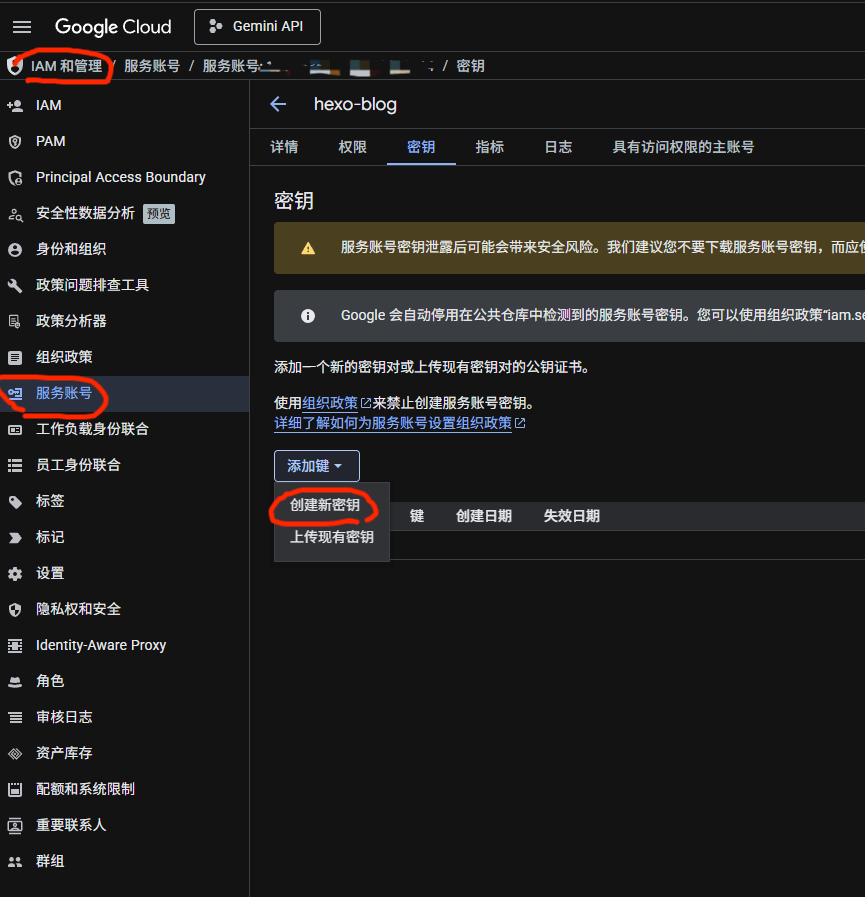
- 打开 https://console.cloud.google.com
- 选择或新建一个项目
- 进入
IAM & Admin(IAM和管理) → Service Accounts(服务账号)
- 点击 Create Service Account,名字随意(如 hexo-indexing)
- 角色不用选,直接完成
- 点击创建好的 Service Account → Keys → Add Key → Create new key → JSON
- 创建后会自动下载一个 JSON 文件,这就是需要的密钥
第二步:启用 Indexing API
- 在 Google Cloud Console 搜索 Web Search Indexing API
- 点击启用
第三步:在 Search Console 授权
- 打开 https://search.google.com/search-console
- 添加并验证 你的博客域名
- 设置 → 用户和权限 → 添加用户
- 填入新 JSON 文件里
client_email 字段的值,权限选拥有者
第四步:安装 sitemap 插件
在 Hexo 项目根目录执行:
1
| pnpm add hexo-generator-sitemap
|
在 _config.yml 中添加配置:
1
2
3
4
5
| sitemap:
path: sitemap.xml
rel: false
tags: true
categories: true
|
之后每次 hexo generate 都会在 public/ 目录生成 sitemap.xml。
第五步:配置 GitHub Actions 自动提交
在仓库 Settings → Secrets and variables → Actions 中添加以下 Secrets:
| 名称 |
值 |
GOOGLE_KEY_JSON |
第一步下载的 JSON 文件的完整内容 |
BING_TOKEN |
Bing Webmaster Tools 中的 API Key |
BAIDU_TOKEN |
百度搜索资源平台中的推送 Token |
在仓库中创建 .github/workflows/submit-urls.yml,内容见下方。每次 push 到 main 分支后,等待 Cloudflare Pages 部署完成(约 2 分钟),自动向三个搜索引擎提交 sitemap。
1
2
3
4
5
6
7
8
9
10
11
12
13
14
15
16
17
18
19
20
21
22
23
24
25
26
27
28
29
30
31
32
33
34
35
36
37
38
39
40
41
42
43
44
45
46
47
48
49
50
51
52
53
54
55
56
57
58
59
60
61
| name: Submit URLs to Search Engines
on:
push:
branches: [main]
jobs:
submit:
runs-on: ubuntu-latest
steps:
- name: Wait for CF Pages deployment
run: sleep 120
- name: Submit to Bing via IndexNow
run: |
curl -s -o /dev/null -w "%{http_code}" -X POST "https://api.indexnow.org/indexnow" \
-H "Content-Type: application/json" \
-d '{
"host": "blog.shanana.top",
"key": "${{ secrets.BING_TOKEN }}",
"urlList": [
"https://blog.shanana.top/sitemap.xml"
]
}'
- name: Submit sitemap to Baidu
run: |
curl -s -o /dev/null -w "%{http_code}" \
-H "Content-Type:text/plain" \
--data-binary "https://blog.shanana.top/sitemap.xml" \
"http://data.zz.baidu.com/urls?site=blog.shanana.top&token=${{ secrets.BAIDU_TOKEN }}"
- name: Submit sitemap to Google Search Console
env:
GOOGLE_KEY_JSON: ${{ secrets.GOOGLE_KEY_JSON }}
run: |
echo "$GOOGLE_KEY_JSON" > /tmp/google_key.json
pip install google-auth requests -q
python3 << 'EOF'
import requests, urllib.parse
from google.oauth2 import service_account
import google.auth.transport.requests
creds = service_account.Credentials.from_service_account_file(
'/tmp/google_key.json',
scopes=["https://www.googleapis.com/auth/webmasters"]
)
auth_req = google.auth.transport.requests.Request()
creds.refresh(auth_req)
headers = {"Authorization": f"Bearer {creds.token}"}
site_url = "https://your-blog-domain.com"
sitemap_url = "https://your-blog-domain.com/sitemap.xml"
encoded_site = urllib.parse.quote(site_url, safe='')
encoded_sitemap = urllib.parse.quote(sitemap_url, safe='')
r = requests.put(
f"https://www.googleapis.com/webmasters/v3/sites/{encoded_site}/sitemaps/{encoded_sitemap}",
headers=headers
)
print(f"Google response: {r.status_code} {r.text}")
EOF
|